
[css] 用compass取代css的

這個東西最近一直聽到一些大神在講,就連webconf的hlb也是在講這個(hlb – Maintainable CSS with Sass and Compass) 然後意外發現XDite 也有再用,乾脆就來玩看看好了,除了他們一直提的可以讓寫css更簡單方便快速之外,有一點我還蠻心動的是據說 他有css-hack的功能,可以幫我們自動處理跨瀏覽器的css語法(但是據說其實針對ie-hack有些還是要自己搞就是,他不支援所有hack) 既然據說這麼好用,當然就來玩看看拉
特色功能幾個介紹:
- 解決browser不相容問題-可以解決broser相容性問題,幫你把一堆前綴詞都補完,例如只要寫+border-radius(5px) 他就會幫你生出
border-radius: 5px;
-moz-border-radius: 5px;
-webkit-border-radius: 5px;
,但是有些ie hack還是要自己寫就是。
- 可以透過類似寫程式的方式寫css- 他可以宣告變數 然後裡面的css就用變數寫就好,還可以加減乘除…
- 會除錯-因為用compass必須要compile所以寫錯的話就會跳error說寫錯了(以前都是用chrome開發工具在那邊看就是..錯會被chrome
槓掉) - 會用感覺就很厲害- 因為他是base on sass而 sass又是在ruby環境下的東西,所以光寫個css就得要先安裝ruby又會看懂sass才會compass光講給不懂的人聽就感覺自己很強大
(自我感覺良好)
好啦,先會安裝再說! 首先先到ruby網站去抓ruby下來裝 我現在最新的版本是Ruby 1.9.3-p374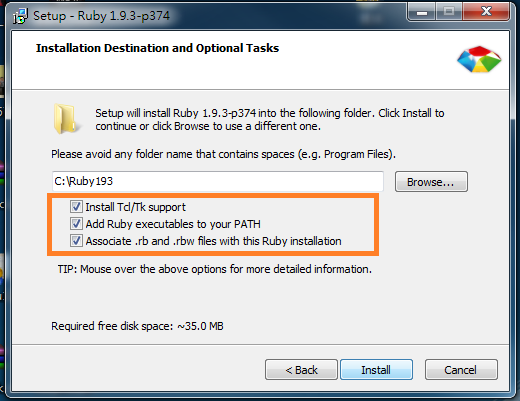
這邊三個都打勾,然後就下一步到底完成。之後到cmd模式下打 gem install compass
他應該就會開始裝了,她要是沒有開始裝 顯示gem不是內部或外部命令…
的話就表示path沒有裝到,你只要把C:Ruby193bin 手動加入windows的path路徑即可
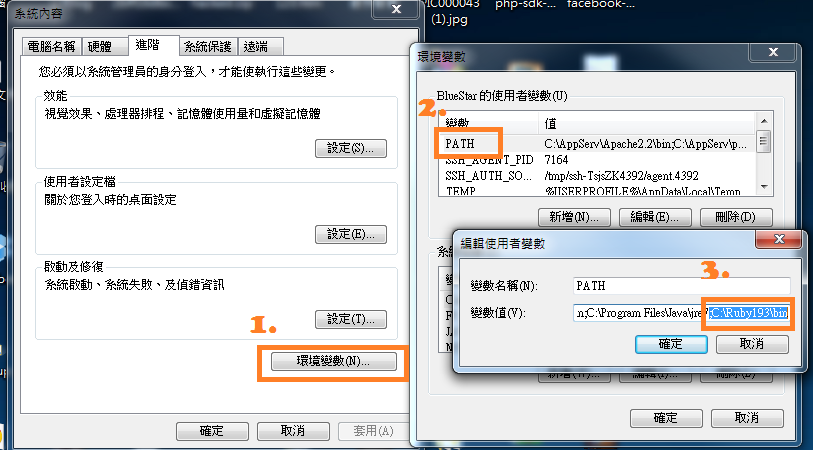
假設你有設定到path的話cmd記得關掉再重開,path才會生效。gem install compass跑完後就表示compass安裝完畢拉,這時候可以開始創一個compass專案了,首先你先在任何地方創一個資料夾,然後在那個資料夾下輸入
compass create mycss //專案名稱mycss 你可以換成你想要的名字
這時候你就會看到資料夾下多了三個子資料夾跟一個檔案(.sass-cache 、sass、stylesheets、config.rb)
進去sass資料夾下,然後自己創一個叫做style.scss的檔案(注意檔案名稱要對!)
然後你就可以在裡面寫你的第一個sass的檔案拉,例如我們在裡面寫
@import "compass/css3";
@import "compass/reset";
@import "compass/utilities/general/hacks";
.box{
@include border-radius(5px);
}
然後在cmd裡面下compass compile mycss 他就會幫你生出css code拉,生出來的code會在stylesheets資料夾下,你可以在裡面找到style.css長的像下面這個很嚇人的樣子
/* line 17, C:/Ruby193/lib/ruby/gems/1.9.1/gems/compass-0.12.2/frameworks/compass/stylesheets/compass/reset/_utilities.scss */
html, body, div, span, applet, object, iframe,
h1, h2, h3, h4, h5, h6, p, blockquote, pre,
a, abbr, acronym, address, big, cite, code,
del, dfn, em, img, ins, kbd, q, s, samp,
small, strike, strong, sub, sup, tt, var,
b, u, i, center,
dl, dt, dd, ol, ul, li,
fieldset, form, label, legend,
table, caption, tbody, tfoot, thead, tr, th, td,
article, aside, canvas, details, embed,
figure, figcaption, footer, header, hgroup,
menu, nav, output, ruby, section, summary,
time, mark, audio, video {
margin: 0;
padding: 0;
border: 0;
font: inherit;
font-size: 100%;
vertical-align: baseline;
}

/* line 22, C:/Ruby193/lib/ruby/gems/1.9.1/gems/compass-0.12.2/frameworks/compass/stylesheets/compass/reset/_utilities.scss */
html {
line-height: 1;
}

/* line 24, C:/Ruby193/lib/ruby/gems/1.9.1/gems/compass-0.12.2/frameworks/compass/stylesheets/compass/reset/_utilities.scss */
ol, ul {
list-style: none;
}

/* line 26, C:/Ruby193/lib/ruby/gems/1.9.1/gems/compass-0.12.2/frameworks/compass/stylesheets/compass/reset/_utilities.scss */
table {
border-collapse: collapse;
border-spacing: 0;
}

/* line 28, C:/Ruby193/lib/ruby/gems/1.9.1/gems/compass-0.12.2/frameworks/compass/stylesheets/compass/reset/_utilities.scss */
caption, th, td {
text-align: left;
font-weight: normal;
vertical-align: middle;
}

/* line 30, C:/Ruby193/lib/ruby/gems/1.9.1/gems/compass-0.12.2/frameworks/compass/stylesheets/compass/reset/_utilities.scss */
q, blockquote {
quotes: none;
}
/* line 103, C:/Ruby193/lib/ruby/gems/1.9.1/gems/compass-0.12.2/frameworks/compass/stylesheets/compass/reset/_utilities.scss */
q:before, q:after, blockquote:before, blockquote:after {
content: "";
content: none;
}

/* line 32, C:/Ruby193/lib/ruby/gems/1.9.1/gems/compass-0.12.2/frameworks/compass/stylesheets/compass/reset/_utilities.scss */
a img {
border: none;
}

/* line 116, C:/Ruby193/lib/ruby/gems/1.9.1/gems/compass-0.12.2/frameworks/compass/stylesheets/compass/reset/_utilities.scss */
article, aside, details, figcaption, figure, footer, header, hgroup, menu, nav, section, summary {
display: block;
}

/* line 4, ../sass/style.scss */
.box {
-webkit-border-radius: 5px;
-moz-border-radius: 5px;
-ms-border-radius: 5px;
-o-border-radius: 5px;
border-radius: 5px;
}
你看一看就知道他除了css reset幫你做好外 連那些跨瀏覽器的東西也都順便幫你產生好好的了且你的scss的程式碼還很簡單 😛
更多的用法可以上compass網站會有很簡單詳細的教學(其實也是因為我還沒看完拉)
後記:說實在的 接下來我的專案要不要導入compass還在猶豫,畢竟很不熟且還有些問題要解,另外就是假設導入的話,我該怎樣在很短時間內讓全team的人都上手都會也是個問題,不過看他們git學得頗快的樣子也許…
我還是得要先會拉。下次RGBA小聚有空的話再問看看Evan wu一下好了,學東西最快的方式就是把身邊所有人都拖下水,可以達到別人幫忙自己學習的神奇功力。
Leave a Comment
About Author

DAVIDOU
一個不務正業,甚麼科技產品都玩的網路宅宅。 If you want to find me,that's easy! I will always on the Internet. so just find me, follow me. I will show you everything fun.
我的社群網路




謝謝教學~~
想問一下 http_path 的定義該怎麼設定,/ 代表設定檔的位置嗎?
怎麼指到網域名稱根目錄下的 css 目錄